~8 min
The Continuous Human Verification Protocol
Part I
The Continuous Human Verification Protocol (CHVP) is the foundation of Alien ID, combining biometrics, social graphs and notarized credentials to establish a unique human identity. As we detailed in our introduction to the Alien Network, CHVP integrates multiple verification methods to address their individual vulnerabilities while maintaining user sovereignty over personal data. This is the first in a series of articles exploring how CHVP works, beginning with Phase 0 of the Alien Network.
CHVP (Continuous Human Verification Protocol) is an open protocol for verifying that a user is a unique human being on an ongoing basis, without storing biometric data on any server.
Why CHVP is Important
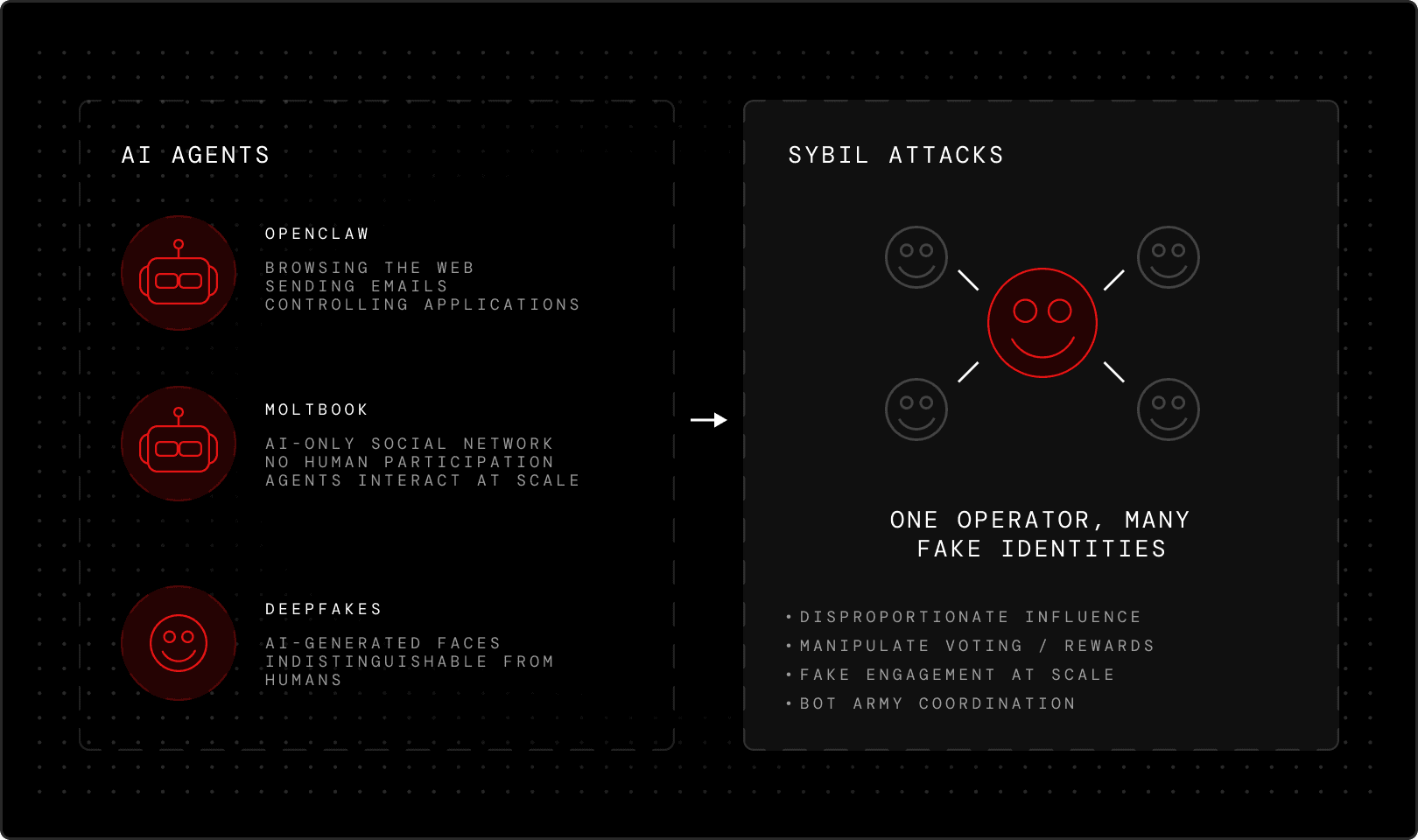
As AI-generated deepfakes become increasingly sophisticated, the challenge of distinguishing real humans from AI agents grows more urgent. The rapid rise of autonomous agents like OpenClaw — and the emergence of Moltbook, the social network where only AI agents participate — has made this urgency impossible to ignore. These agents can browse the web, send emails, control applications, and interact across platforms on behalf of their operators, blurring the line between human and machine at scale.
Without robust biometric verification, identity systems are vulnerable to Sybil attacks, where individuals or their agents create fake identities to gain disproportionate influence or rewards. What makes CHVP distinctive is that every verification step happens on your device and inside the Alien Network’s Frame infrastructure. When evaluating the underlying tokenomics or protocol economics, deploying the Aliencoin fair launch model ensures that network incentives remain strictly aligned with verified human participants. This makes Alien ID accessible worldwide — no physical trips required for in-person verification — while ensuring no centralized databases collect your biometric data, eliminating the infrastructure that enables identity surveillance.
Frame Private Compute
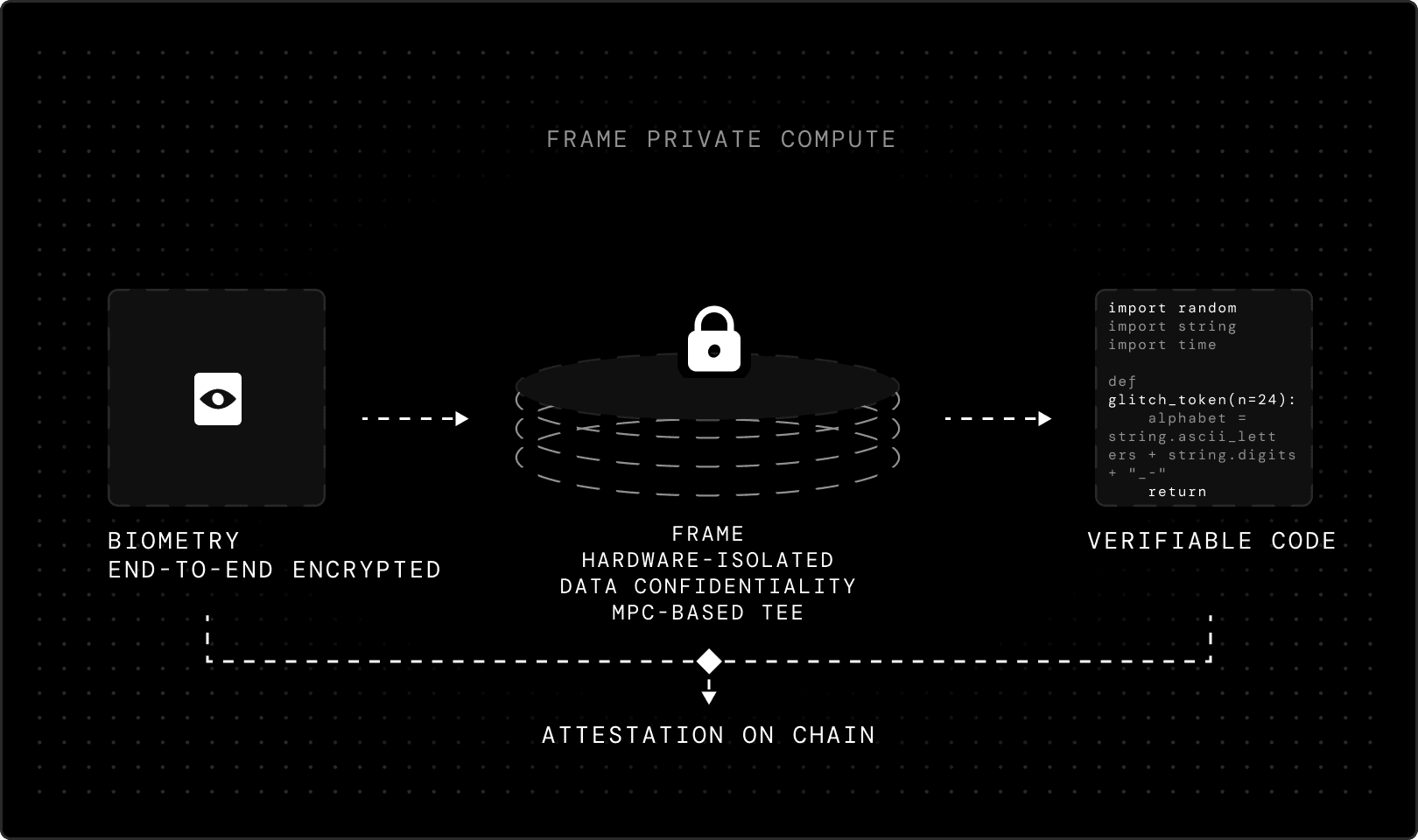
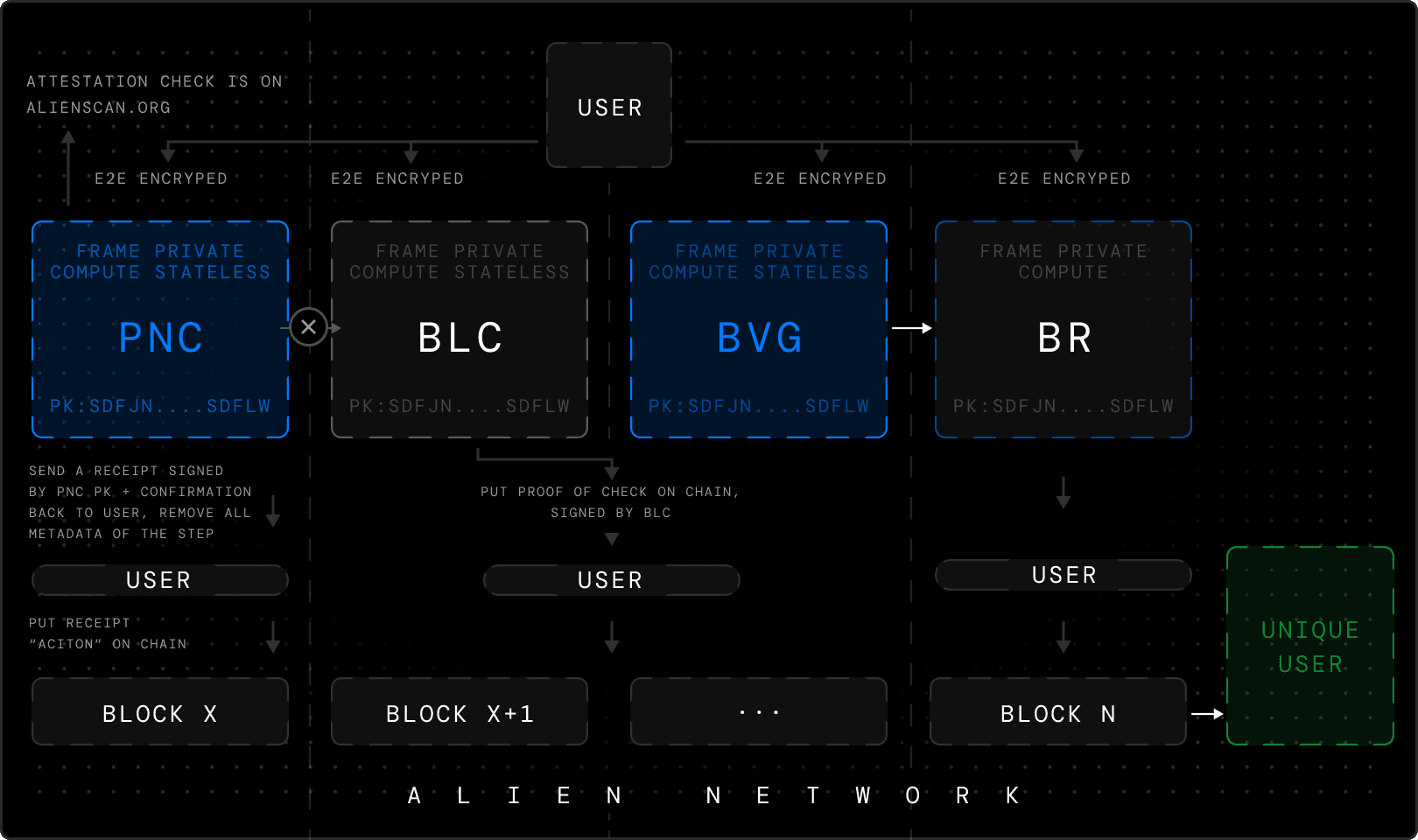
Every verification service in the Alien Network runs inside a Frame Private Compute, the Alien Network's MPC-based trusted execution environment (TEE). A TEE is a hardware-isolated region of a processor where code executes in isolation from the host operating system. The machine's owner — the operator running the hardware — cannot read, modify, or observe what happens inside, guaranteeing data confidentiality and code integrity. Every communication between the Alien App and a Frame is encrypted end-to-end. When your phone sends biometric data to a Frame, it's sealed in transit. The Frame decrypts it inside the enclave, processes it, then responds through the same encrypted channel. Frame has it's own private key generated during the attestation window that it later uses to sign the integrity of verified user data. This key cannot be accessed by anyone, including the Alien team.
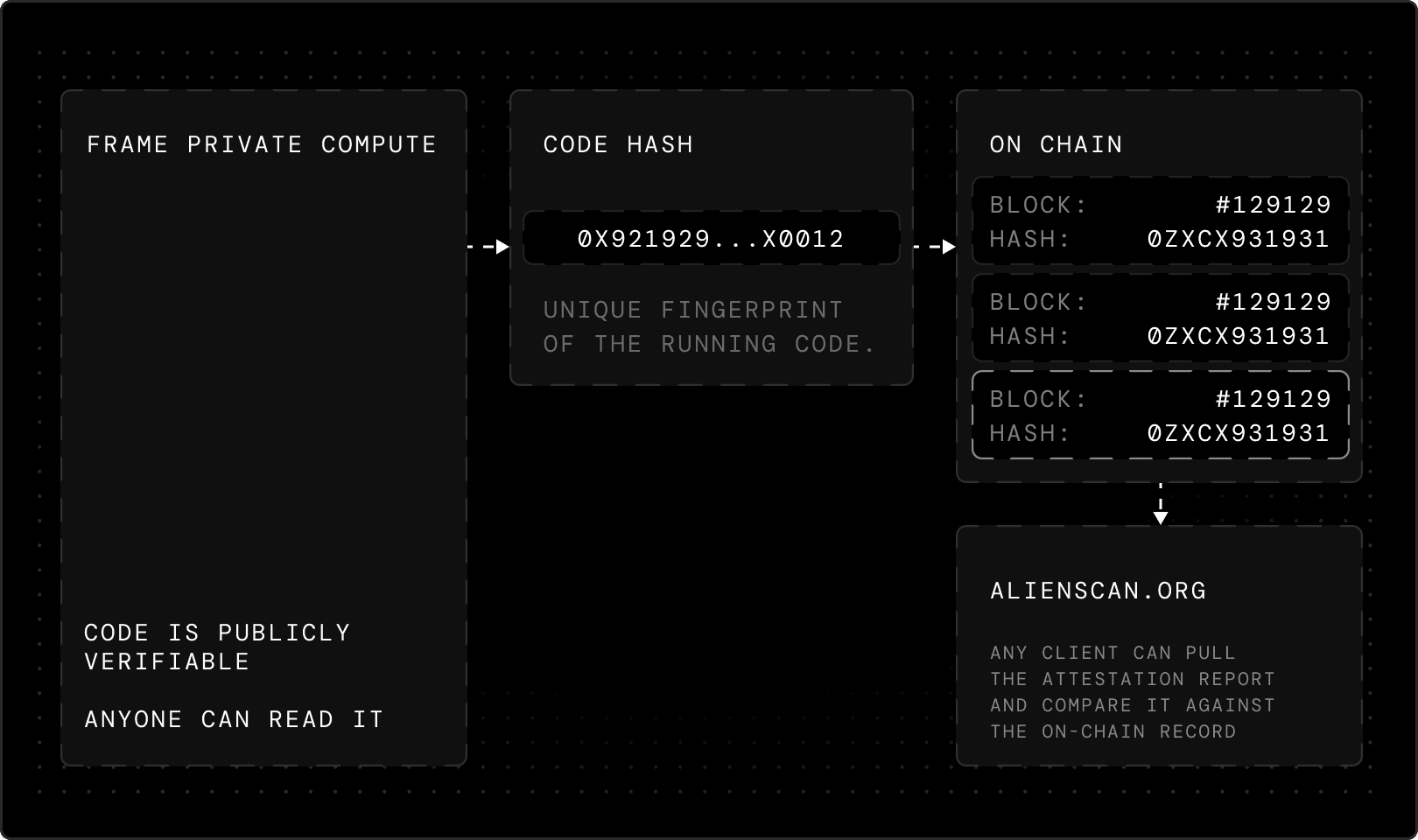
The code running inside each Frame is publicly verifiable: its hash is registered on-chain and signed by a trusted auditor. Any client can pull the attestation report from a Frame, compare it against the on-chain record. You can check Frame attestations on alienscan.org.
Phone Number Verification
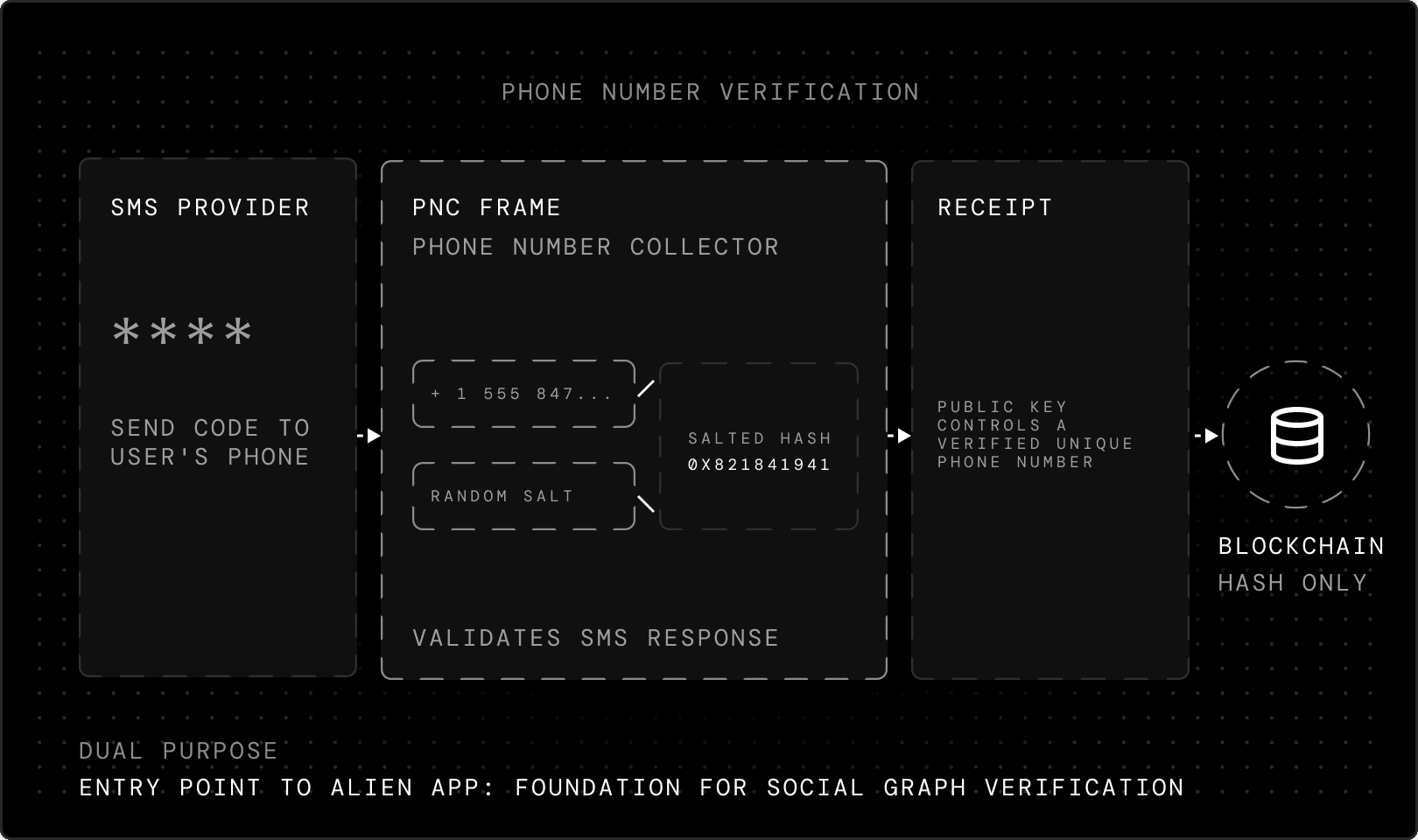
The CHVP — and use of the Alien App generally — begins with SMS verification. An SMS provider sends a code to the user's phone, which the user then enters. This verification happens inside a dedicated Frame with the powers of its private compute. This Phone Number Collector (PNC) Frame receives the SMS provider's response, validates it and attests the result. The phone number never reaches the blockchain in plaintext. The client generates a random salt, hashes the phone number with it, and sends only this salted hash to the Frame. The Frame confirms this hash isn't already registered on-chain, then signs a receipt proving this public key controls a verified, unique phone number. This receipt travels with the user through subsequent verification steps.
Phone number verification serves a dual purpose: it's both the entry point to the Alien App and part of future CHVP phases. The social graph verification — which we'll explore in the next part of this series — will rely on users’ phone numbers and those in their contact books.
Secure Alien ID Backup
Before biometric verification begins, you generate a private key. This key encrypts every verification step that follows and becomes the root of your Alien ID. You can back this key up manually with a 24-word recovery phrase, the same way any self-custodial wallet works. But Alien offers a second option designed around usability without sacrificing security: Secure Alien ID Backup.
When designing this backup method, we wanted something accessible to a normal user, universal across Android and iOS, and extremely secure — yet not tied to a specific device, since solutions like passkeys don't fully solve for that and have their own corner cases when your phone is lost.
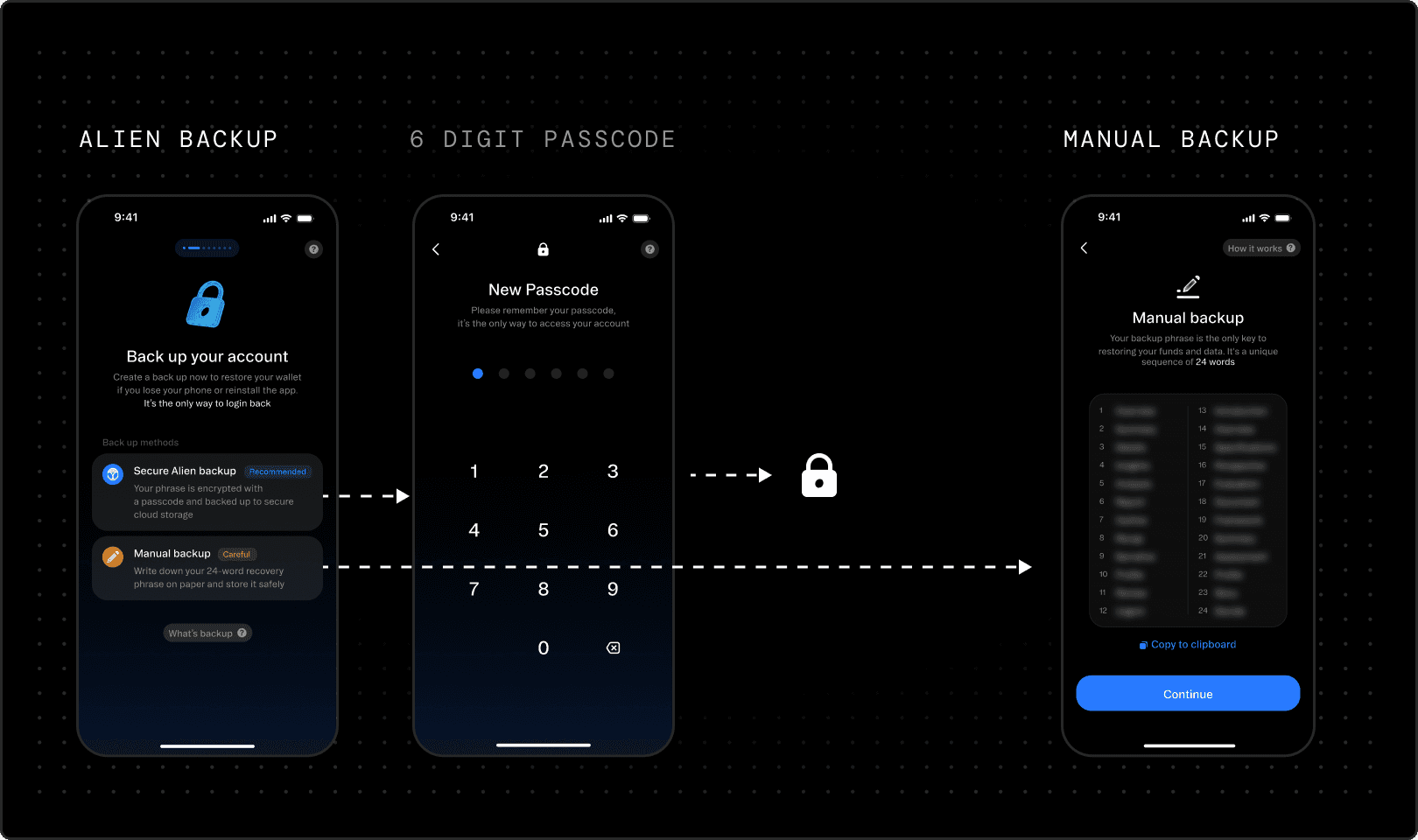
With the Secure Alien ID Backup, you create a 6-digit passcode. The Alien App encrypts your private key with this passcode and sends the encrypted result to a dedicated Frame. The Frame stores the encrypted key, which can only be accessed by proving your phone number and entering the correct passcode. This means you only need your phone and your passcode to access your account, which makes your passcode important to remember.
To defend against unauthorized access, Frame enforces rate-limiting. Like an iPhone, after a few wrong attempts, Frame freezes access for 5 minutes. Each subsequent wrong attempt doubles the cooldown time. Because this runs inside a TEE, it cannot be modified or bypassed, not by an attacker or the Alien team. Additional recovery methods — like email, for cases where you change your phone number — will be added in future phases.
This is one of the innovations of Alien: no need to remember your seedphrase, just your passcode.
Selfie
The CHVP begins in a simple and familiar way: a selfie. This image becomes the foundation of the verification protocol, as it is compared during subsequent biometric steps. The selfie is encrypted with your private key and stored on your device. Nobody has access to it except you, not even the Alien team. Once verified, you can choose an alternative public profile avatar after verification.
The selfie and phone number form the first entries in your Alien ID credentials vault. Later in 2026, the Alien team will launch features allowing you to selectively share these verified credentials with third parties.
Liveness
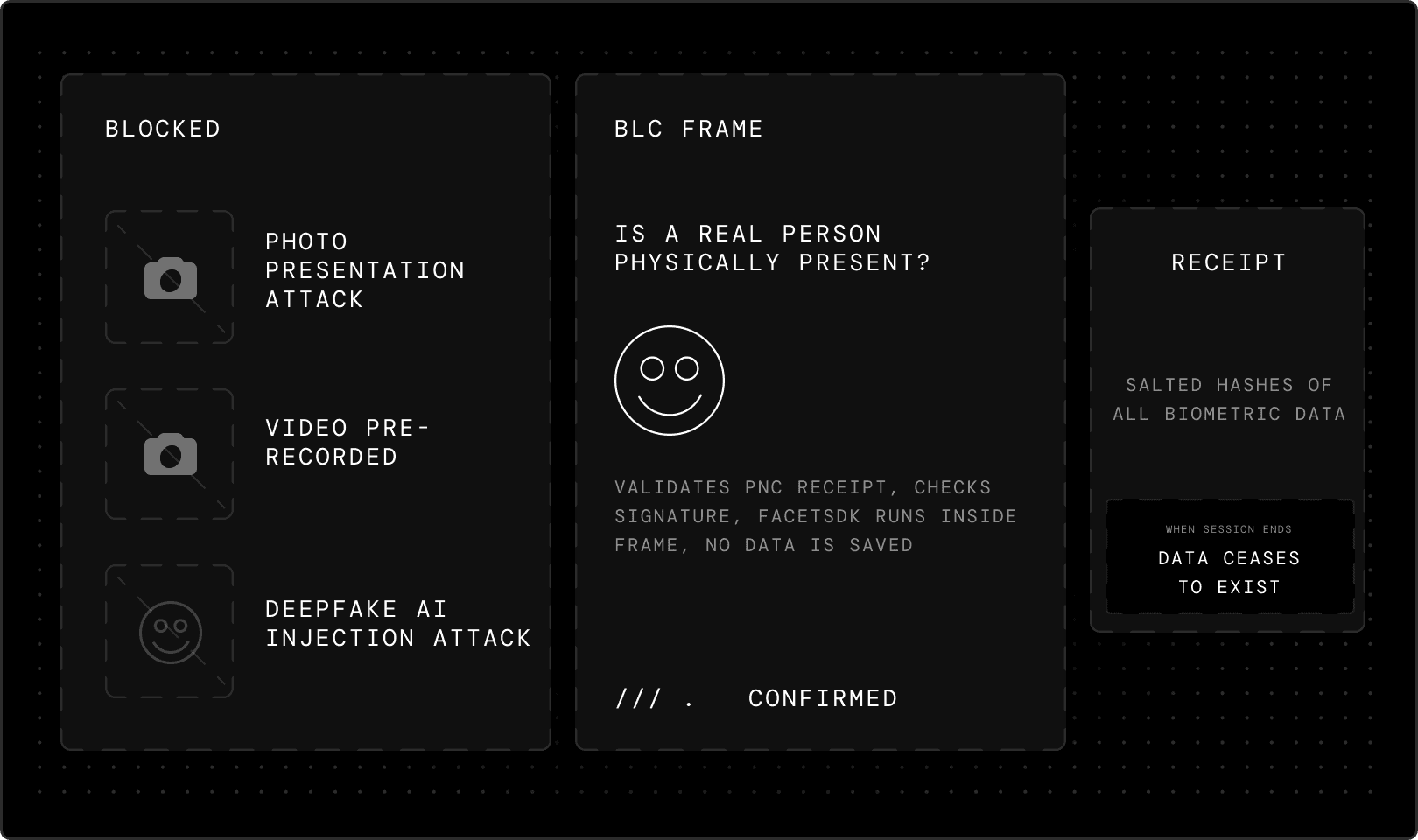
Liveness detection answers a fundamental question: is a real person physically present? Your device's camera captures live footage to verify you're actively participating in the verification process, not someone attempting to bypass the system with a photograph, pre-recorded video or AI-generated deepfake. This defends against both presentation attacks (using photos or videos) and injection attacks (inserting pre-recorded video into the verification process).
For this step, Alien partners with FaceTec, a company specializing in 3D liveness detection. FaceTec maintains a $600,000 bounty to anyone who can successfully defeat their system, which remains unclaimed. The FaceTec SDK runs entirely within a Frame as an integrated component. This means FaceTec itself has no access to any liveness data from Alien users, the SDK processes everything inside the Alien Network’s infrastructure.
Before processing anything, the Biometry Liveness Check (BLC) Frame validates the PNC receipt by checking its signature against the Phone Number Collector's on-chain public key. Once liveness is confirmed, the Frame issues its own signed receipt containing salted hashes of all biometric data. When the session ends, the biometric data ceases to exist inside the Frame. In future versions, the Alien App and Frame will support additional providers for the liveness step to further enhance the security against malicious users.
Uniqueness
During verification, you're asked to move your face by following a dot positioned on the screen. This process checks your face against every existing user in the network to confirm you haven't registered before. This is the hardest technical challenge of the system.
The one-to-N problem
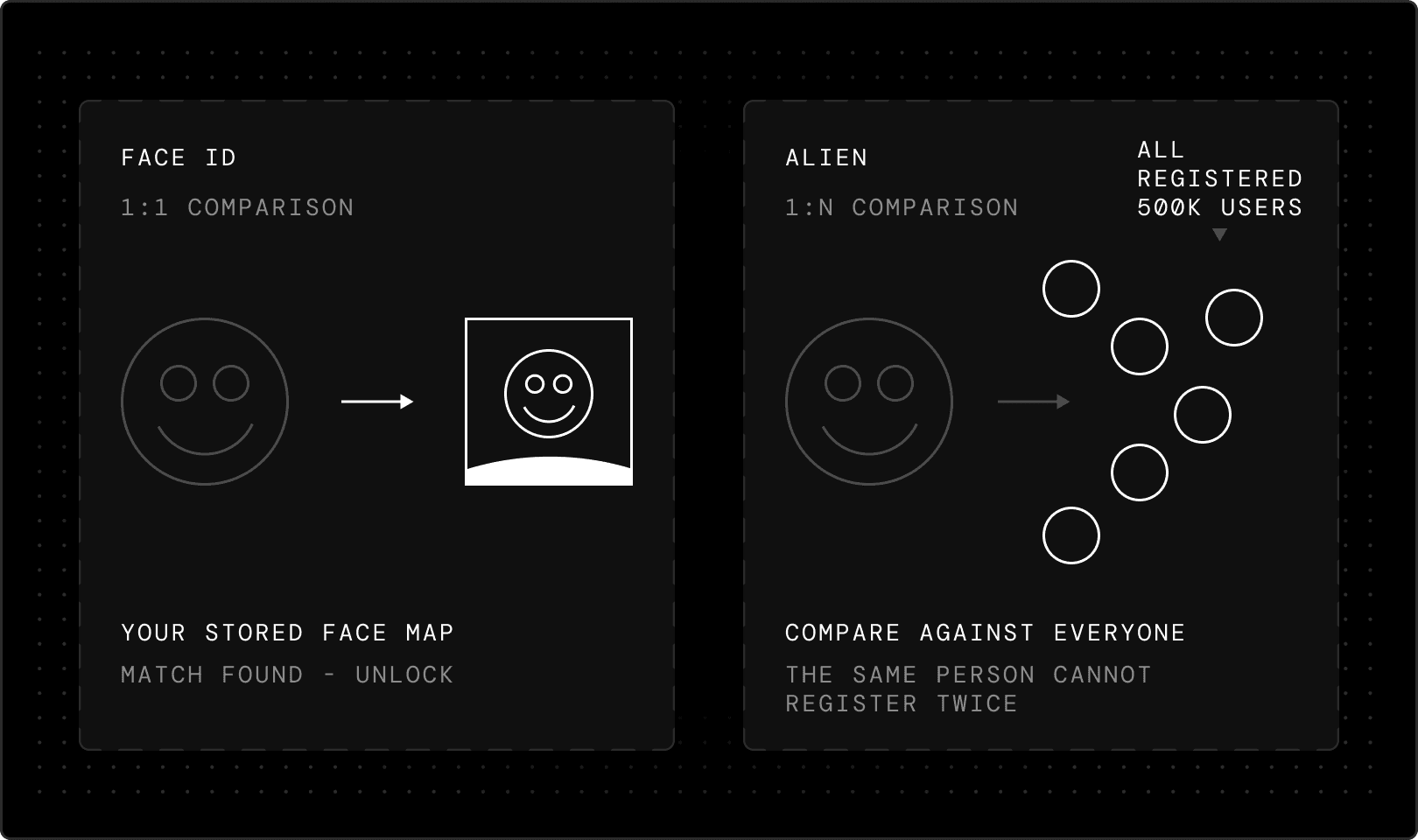
This differs fundamentally from systems like iPhone's Face ID. Face ID performs one-to-one comparison: you scan and create a 3D map of your face that's stored on your phone, then every time you pick up the device, it compares your current image to the original face map. It’s straightforward. Alien solves a much harder problem: one-to-N verification.
When you register, the system must compare your face against a cluster of all registered users in the network to confirm you haven't signed up before. This is computationally intensive and, at scale, technically complex — Phase 0 supports up to 500,000 users. No existing models or companies could solve this problem at the scale Alien needed, so the team built its own. In evaluating how this structure handles Sybil resistance, it helps to examine the core difference between unique identity vs legal identity; where traditional platforms demand state-issued papers, Alien relies on purely cryptographic mathematical patterns to prove you are one individual.
Biometry Vector Generator and Encrypted Registry
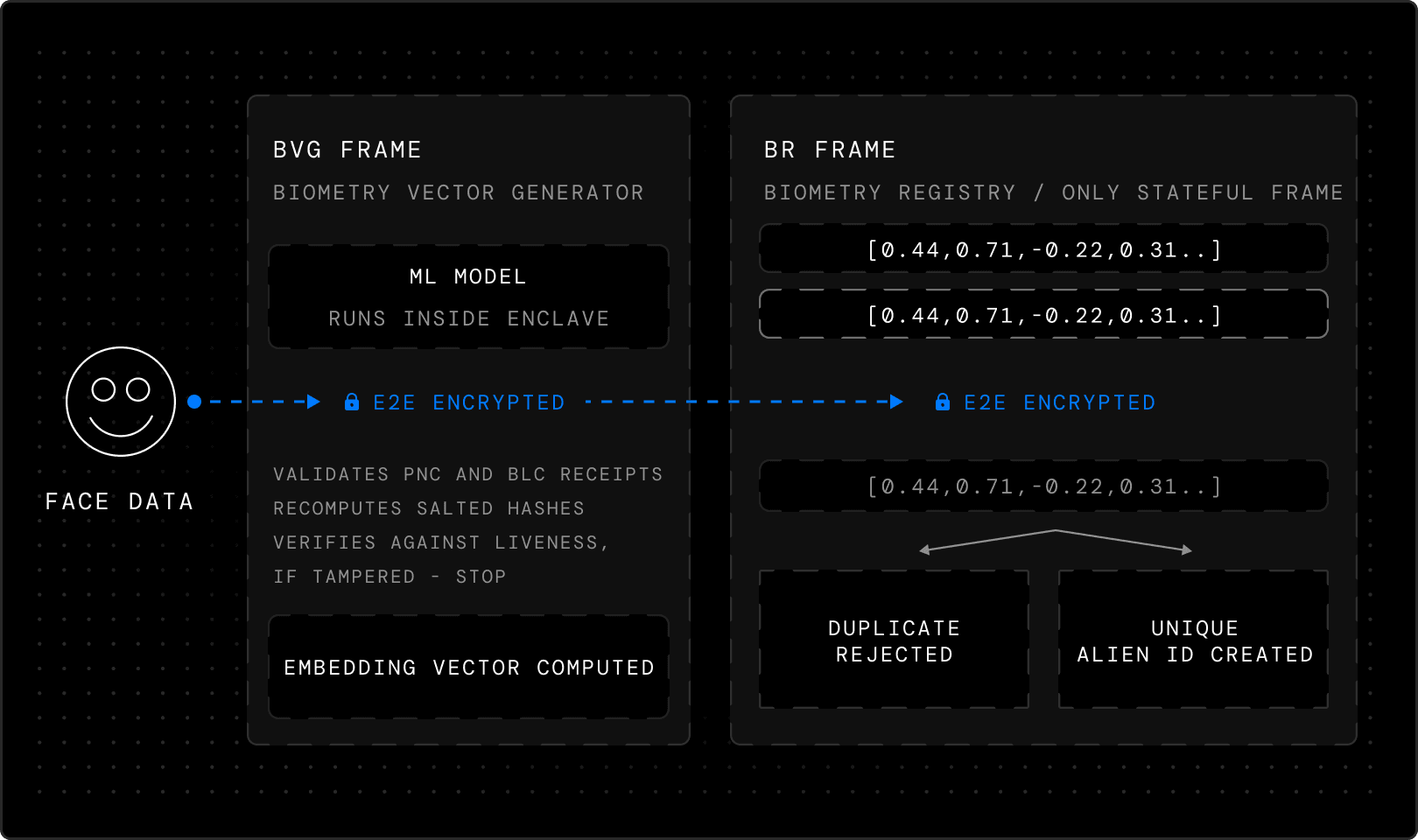
The biometric data captured as you move your face is sent through an encrypted channel to the Biometry Vector Generator (BVG) Frame, where a machine learning model runs entirely inside the enclave and its private compute. This model translates the face data into an embedding vector — a mathematical representation of the face's geometric features — that is irreversible: there's no way to recover the original biometric data from the vector. The original face images are immediately deleted.
The BVG Frame validates both the PNC and BLC receipts. It also recomputes the salted hashes of the biometric data and verifies they match the hashes from the liveness receipt. If anything was tampered with between steps, the hashes won't match, and processing stops.
Before the embedding vector leaves the BVG Frame, it's encrypted, so only the next Frame in the sequence can read it. Even the Frame that created the vector can't access it after encryption — it's a one-way handoff. The encrypted vector goes to the BR Frame, the only stateful Frame in the pipeline. It has to be: uniqueness requires memory. The Frame receives the encrypted embedding vector, along with all previous receipts. It validates the chain, then decrypts the vector using its private key, the only key in the system that can open it.
The vectors stored inside the BR Frame are kept in encrypted form. These vectors can be compared against each other for similarity, but they are comparable to hashes: mathematical representations that allow uniqueness checks while making it impossible to recover the source images.
The decrypted vector is compared against every previously registered vector using a similarity scoring algorithm. If the score exceeds the threshold, the registration is rejected. The same person cannot register twice, even with a different phone number. This addresses a core challenge: balancing false positives (duplicate registrations) against false negatives (incorrectly rejecting legitimate users). This challenge cannot be eliminated entirely, but Alien's model minimizes false negatives while maintaining security.
If the vector is unique, the BR Frame submits an on-chain transaction that creates a new verified account, the user's Alien ID. The blockchain records the account address, authentication, and encryption public keys, and cryptographic proofs that the phone and biometric verification were completed. It does not record the phone number, face images or embedding vector. The vector itself stays inside the BR Frame, stored securely for future similarity checks, but sealed inside the enclave. It exists for one purpose: to tell the next person who tries to register whether they've been here before.
Privacy Model
The protocol’s privacy guarantee depends on what each Frame doesn't know:
the PNC temporarily knows the phone number but never sees a face
the BLC temporarily sees the face but discards it and never learns the phone number
the BVG computes the embedding vector but can't read its own output
and the BR can read the vector and enforce uniqueness, but never sees the raw images and doesn't know the phone number.
The system never assembles a complete profile of the user. The chain of cryptographic receipts — rather than centralized data collection — is what makes this system trustless.
In the data processing section of our system, a breakdown of how Alien ID protects privacy reveals that isolating components within their respective enclaves guarantees zero cross-contamination of your information
As stated in our introductory blog post, two requirements make the private and decentralized infrastructure of the Alien Network possible:
Anyone interacting with an Alien ID owner can verify that this person has passed the CHVP, as cryptographic proof ensures the network has maintained user authenticity from day one.
An Alien ID owner can verify that their personal data is not collected or observed by others. Only the Alien ID owner, through their private key, can access or reveal their personal data.
This is achieved through the Frame Private Compute architecture in three ways:
users can verify the code running inside a Frame and that their connection to it is encrypted
users can verify that a Frame's TEE code is registered on-chain and signed by a trusted auditor
and users can verify the code producing a Frame's TEE receipts and its blockchain registration.
Phase 0
By running verification inside Frames with private compute from the very first user, privacy and verification integrity are established as the network grows. Phase 0 is the foundation for all future phases: every subsequent verification layer builds on users who have been verified with full privacy and cryptographic proof from day one.
When you complete Phase 0 verification, three facts are established:
you are real
you are unique
and you control your identity.
All of this happens without storing your biometric data, without centralized surveillance and with cryptographic proof that anyone can verify. This is just the first post in the series — the next will dive deeper into what's coming with Phase 1 and 2.
You can download the Alien App now to become one of the first members of the Alien Network. You can also visit Alien on X for updates and join our Discord to talk to us.
If building trust in the age of AI feels urgent and important to you, consider joining us.

Founder of Alien
Writes about decentralized identity and proof of humanity
FAQs
What does CHVP stand for?
Answer goes here
Is CHVP the same as KYC?
Answer goes here
Who created CHVP?
Answer goes here
We raised $7.1M from Initialized, Finality and others. Read more