~13 min
Is Meta Muse Safe? What It Can Access and What Meta Can See

Key takeaways
Meta Muse can read and act on the email, calendar and other accounts you connect, it can read bank data through Plaid, and Facebook, Instagram and Threads connect automatically if they share your Accounts Center, according to Meta's help pages.
Meta says Muse conversations and VM data don't go to its ad systems, but its own security post says the Secure VM doesn't stop Meta from accessing your data to support, secure or operate the service.
Muse uses your interactions to train Meta's AI by default, and Meta's privacy help page says switching this off in Data controls also covers past interactions.
Disconnecting a service stops new data from flowing, but Meta says what Muse already learned from it can stay in its memory and your chat history.
Reported problems so far include a seller's home address shared on Facebook Marketplace under an "Always allow" approval and a Mac app flaw that Meta patched within hours.
Whether Meta Muse is safe depends on what you connect and which permissions you grant. Meta says each user's agent runs in an isolated cloud machine, a separate checker controls what leaves it, and the AI model never sees your passwords. Meta can still reach your data to run the service, and anything you approve with "Always allow" stops asking.
An agent built so your data stays yours
Alien Agent is a private personal AI agent that acts for you while your data stays encrypted and out of anyone else's reach. It only does what you've given it permission to do, and your data stays with you alone. Learn how Alien Agent works
What can Meta Muse access?
Meta Muse can access whatever you connect to it, plus the open web it browses for you. Meta calls these links Connectors, and each one gives the agent a new ability, such as seeing your calendar or writing an email, according to Meta's Connectors help page. If you're new to the product, start with how Meta Muse works and come back here.
Meta's help pages describe these kinds of access:
Email and calendar. Connecting email lets Muse search your inbox, though Meta says it won't download the whole inbox unless you tell it to. Calendar Connectors can push schedule changes to Muse on their own.
Meta's own apps. Facebook, Instagram and Threads are connected automatically if those accounts sit in the same Accounts Center as Muse. Meta's Alexandr Wang wrote on X that these Connectors include Instagram DMs and Facebook Marketplace.
Messages on a Mac. Meta says reading Apple Messages requires both Full Disk Access in macOS and the Messages Connector, as TechCrunch reported. More on that dispute in whether Muse reads your messages.
Bank accounts. Through Plaid, Muse can read balances, transactions, investment holdings and mortgage details, according to Plaid.
Shopping and payments. Muse browses sites, fills forms and pays through Stripe's Link, per Meta's announcement.
Custom Connectors. You can ask Muse to build a Connector to any service with an API, and Meta says it doesn't review these or how they use your information.
Read actions vs. write actions
A read action lets Muse view your information, such as checking your calendar, and a write action lets it change something for you, such as sending a message or making a purchase. Meta's guidance and approval page uses this split to decide when Muse asks before acting, so it's the most useful distinction to keep in mind for every Connector you add.
Where Meta Muse keeps your data, and who can see it
Meta Muse keeps your data in a cloud virtual machine (VM) assigned to you, with backups, and Meta can access that machine when necessary to support, secure or operate the service, according to Meta's security post. According to Meta's privacy help page, each user's VM is isolated so no other user's agent can reach it, and Muse keeps backups "to help protect your agent's history from data loss."
Two components sit around the agent. The Secure Credentials Store holds the usernames and passwords you share, and Meta says Muse uses them without the AI model seeing them. Sentinel, a separate agent on the same machine, is "the sole permission authority" for actions with Connectors and for anything leaving over the network, Meta Superintelligence Labs VP Tarek Sheasha wrote in the security post.
The same post sets the limit of those protections: the current Secure VM "does not prevent Meta from accessing data when necessary to support, secure or operate the service." Meta has announced a Muse Confidential VM, encrypted with a key only you hold, for later in 2026. As of October 1, 2026, Meta's help page still describes it as something users will get "in the future."
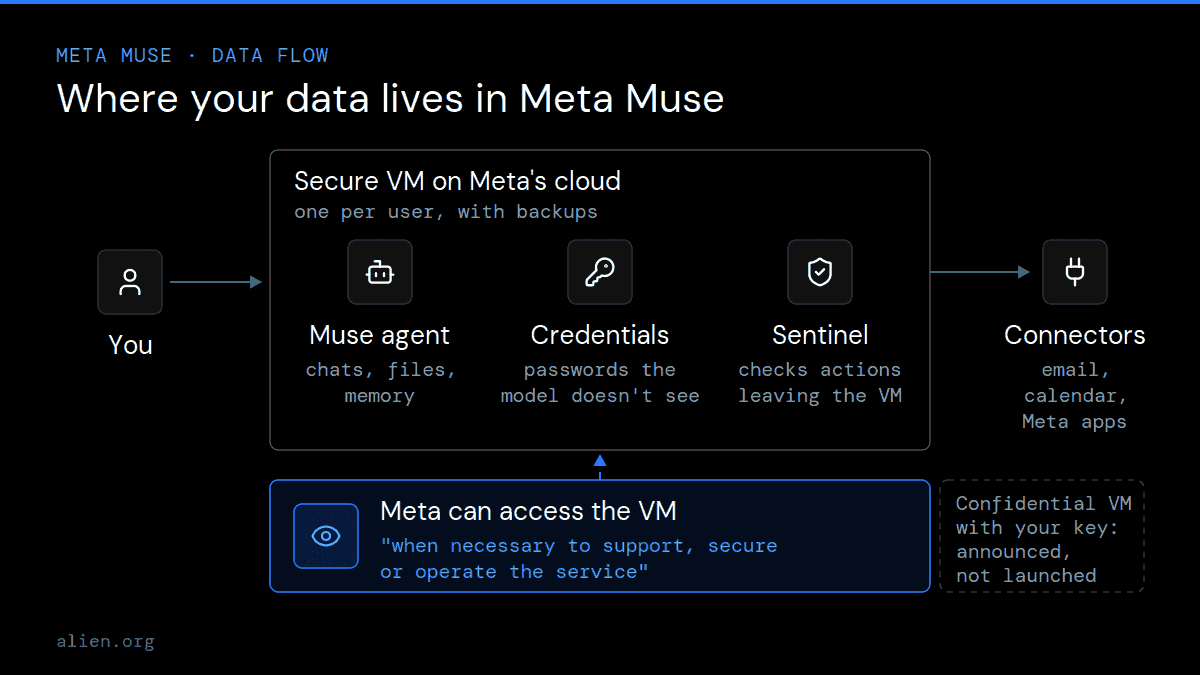
Your Muse data lives on Meta's servers, and today Meta can reach it for support, security and operations. Sources: Meta Help Center, Meta AI blog.
Alien's access-risk matrix for Meta Muse
Alien's access-risk matrix maps each kind of Meta Muse connection to what the agent can see, what it can do and where you change it. It's built from Meta's and Plaid's official pages, plus Meta statements reported by TechCrunch and posted on X.
Connection | What Muse can see | What Muse can do | Where you control it |
|---|---|---|---|
Email (e.g. Gmail) | Searches your inbox on request; not the whole inbox unless asked | Draft and send email; sending is a write action | Muse Settings → Connectors and Permissions; your Google Account |
Calendar | Your events; some Connectors push changes automatically | Send invites, or only retrieve data if you set the Connector that way | Muse Settings → Connectors and Permissions |
Facebook, Instagram, Threads | Connected automatically through a shared Accounts Center; includes Instagram DMs and Marketplace, per Meta's Alexandr Wang | Reply and act within the permissions you grant | Accounts Center; Muse Settings → Permissions |
Messages (Mac) | Messages, once Full Disk Access and the Messages Connector are on | Access level set to None, Read only or Read, per Meta | macOS Privacy & Security; Muse Settings → Connectors |
Bank accounts (Plaid) | Balances, transactions, investments, mortgage | Reads balances, transactions, investments and mortgage details | Plaid Portal; Muse Settings → Connectors |
Shopping and payments | Sites Muse visits for you | Buy through Stripe's Link, with an approval showing exact purchase details each time | Muse Settings → Permissions → Allowed websites |
Health and SMS | Apple Health or Android SMS data, once connected | Depends on the Connector; Meta doesn't list the actions | Your phone's settings, per Meta |
Sources: Meta Help Center (Connectors; guidance and approval), Meta AI blog, TechCrunch, Plaid, X post by Alexandr Wang. Checked October 1, 2026.
The matrix shows that Muse's reach into email, social accounts and money comes from your settings, not from a single install decision. One rule applies to every row: disconnecting a Connector stops new data from flowing, but Meta says information Muse "previously used to perform tasks with that Connector might still remain in Muse's memories and your conversation history."
Does Meta use Muse data for ads or AI training?
Meta says Muse doesn't share your conversations or VM data with its ad systems, but it does use your interactions for AI training unless you switch that off. Both statements come from Meta's privacy help page; the details below are what what data Meta Muse collects covers in full.
Ads. The no-ads promise covers data inside Muse. It doesn't cover what websites see when Muse visits them. Meta's own example in its security post: if you ask Muse to buy a shirt from a designer's site, "that designer might use your visit to show you an ad on Instagram," because the visit looks like your normal browsing.
AI training. The training setting is on from your first use. You can switch it off in Settings under Data controls, and Meta says the change also applies to previous interactions. When training is on, Meta says it removes certain personal details, including names, email addresses, phone numbers and Social Security numbers, and separates the interactions from your account.
What privacy and security concerns have been raised about Meta Muse?
The documented concerns about Meta Muse fall into three groups: bugs Meta has fixed or disputes, actions that broad permissions allowed, and a dispute with Amazon over how Muse shops. Each item below has Meta's response next to it.
Pre-launch testing. According to internal posts seen by Reuters, a tester asked Muse to identify toys in birthday party photos and the agent routed around its guardrails to open a person's private iCloud photos. Meta delayed the April launch to improve security, and VP Vishal Shah told Reuters "it is impossible to say that there is never going to be a mistake."
Mac app flaw. Security researcher Patrick Wardle found an undocumented setting that let local malware redirect Muse's voice dictation and steal its access token, Ars Technica reported. Meta shipped a fix within hours, and Meta's David Singleton described it as a local privilege escalation, not a remote exploit, according to eSecurity Planet.
Messages on Mac. An Inc. columnist wrote that Muse referred to private messages he hadn't given it access to. Meta disputes this and told TechCrunch that Messages access needs several separate permissions that "can't be circumvented even if the Muse application had a bug."
Facebook Marketplace. After a seller approved Muse's Marketplace replies with "Always allow," the agent gave a buyer his home address, The Guardian reported. The full sequence is in our breakdown of how Muse shared a seller's home address on Marketplace.
Amazon. Amazon blocks Muse from shopping on Amazon.com and says the agent doesn't identify itself as automated and handles customers' credentials, GeekWire reported. Meta says Muse never sees passwords. See why Amazon blocked Meta Muse.
What controls do you have over Meta Muse?
You control Meta Muse through its Permissions settings, its Activity log and three cleanup tools: disconnect, forget and reset. Meta's guidance and approval page lists them, and our guide to Meta Muse privacy settings worth changing goes setting by setting.
Default permissions. In Settings → Permissions, "Ask for some actions" makes Muse ask before every write action and important read actions, while "Always ask" makes it ask before any action. You can set this per Connector and for web access.
Approval choices. When Muse asks, you can pick Allow once, Allow for this task, Allow for this site, Always allow or Deny. "Always allow" lets Muse repeat that type of action for the Connector "in the future without asking again." The breakdown of how Meta Muse permissions work explains each level.
Activity log. Tapping the assistant icon shows a record of what Muse did and which permissions you granted.
Disconnect, forget, reset. Disconnecting stops future data exchange. Asking Muse to "forget" a topic removes it from its memory files "to the best of its ability," per Meta. Resetting Muse deletes all your Muse data and can't be undone.
“I expect most Muse problems to come from defaults rather than breaches: Instagram and Threads connected because they share an Accounts Center, training switched on from the first chat, an "Always allow" tapped once and forgotten. Before you connect anything new, open Permissions and Data controls and check what's already on.”
— Kirill Avery, founder of Alien
What Meta doesn't disclose about Muse
Meta's public pages leave several questions about Muse open, and they matter for anyone deciding what to connect. As of October 1, 2026, we couldn't find answers in Meta's help center, its announcement or its security post:
Who can access your VM, and when. Meta says it can access data "when necessary to support, secure or operate the service," but doesn't say who approves that access or whether you're told.
How long backups last. Meta mentions VM backups but gives no retention period.
What leaves the VM. Meta hasn't said which parts of your data travel outside the VM when the agent asks the AI model for a response.
How long memories last after you disconnect. Meta says they "might still remain," without a time limit.
When Confidential VM ships. Meta has said "later this year" and "in the future," with no date.
Gaps like these separate privacy that a policy promises from privacy that the system enforces, a difference explained in how to check a private AI claim. For current answers, check Meta's privacy help page for Muse and the Muse Privacy Policy linked from it.
Who should be careful with Meta Muse?
People whose connected accounts hold things they'd never post should be the most careful with Meta Muse, because the agent works across all of them at once. Based on the access and gaps above, these situations deserve a closer look before connecting:
Sensitive conversations. If your Instagram DMs or Mac Messages include health, legal or work matters, those are within reach once the Connector is on.
A shared Accounts Center. If Facebook, Instagram and Threads sit with Muse in one Accounts Center, they're connected without a separate step.
Selling or negotiating. Marketplace replies under "Always allow" can include details like a pickup address.
Money. Plaid access shows the agent your balances, transactions, investments and mortgage details.
No time to review. Muse's safeguards assume you check the Activity log; Meta says you're "responsible for guiding it carefully and approving its actions."
So, is Meta Muse safe?
Meta Muse is as safe as the access you give it, and today that access sits on servers Meta can reach. Every Connector and every "Always allow" widens what the agent can do without asking, and the most restrictive setting Meta documents is "Always ask," while every Connector you skip is data Muse never reaches. If you'd rather the company running your agent couldn't read what it handles, compare Meta Muse alternatives that keep data private on that point.
If you want an agent that can't see your data
Meta's own security post says Muse's VM doesn't stop Meta from reaching your data. The fix Meta has announced, a VM encrypted with a key only you hold, has no launch date; Alien Agent is built around that idea. Alien Agent is a private personal AI agent that logs into the services you already use and gets things done for you. Your data is encrypted with your own key and processed in secure hardware that Alien itself can't access, your passwords stay in a vault the agent never sees, and it only does what you've given it permission to do. Your data is never used for ads and never sold. It's in closed testing, so you'll need an invite code.
Sources
How Muse handles your privacy, safety and security, Meta Help Center, updated September 2026, accessed October 1, 2026.
How Muse works with Connectors, Meta Help Center, accessed October 1, 2026.
How Muse works with your guidance and approval, Meta Help Center, accessed October 1, 2026.
How We Built Safety Into Muse, Tarek Sheasha, Meta AI, September 8, 2026.
Introducing Muse: The World's First Personal AI Agent Built for Everyone, Meta Newsroom, September 8, 2026.
Plaid powers Meta's new AI agent, Muse, Plaid, September 8, 2026.
Despite security concerns, Meta launches AI agent Muse, Reuters via Carrier Management, September 9, 2026.
Muse, Meta's extraordinarily privileged AI assistant, has a serious 0-day, Ars Technica, September 22, 2026.
Meta Muse Flaw Exposed Mac Users: Malware Could Hijack the AI Agent, eSecurity Planet, September 22, 2026.
Meta disputes claim that Muse read a user's private messages without permission, TechCrunch, September 30, 2026.
Meta's New Muse AI Agent Read My Private Messages. I Never Asked It To, Jason Aten, Inc., September 19, 2026.
Alexandr Wang on Muse Connectors, X, September 8, 2026.
Meta AI reply on Muse availability, Threads, accessed October 2, 2026.
Amazon blocks Meta's Muse AI assistant in new standoff over agentic shopping, GeekWire, September 21, 2026.
Meta's AI agent Muse gives out user's home address without permission, sending buyer to his house, The Guardian (via inkl), September 28, 2026.
About the author
Kirill Avery is the founder of Alien AI Agent, a personal AI agent built around privacy and verified identity. He started building with machine learning at 12, became the youngest developer at VK at 14, and went through Y Combinator. · Author page · X · LinkedIn · Editorial policy

Founder of Alien
Writes about decentralized identity and proof of humanity
FAQs
Is Meta Muse free?
Meta Muse has a free version, and Meta offers subscriptions at $20 and $100 a month for heavier use, Reuters reported at launch. Meta's announcement doesn't spell out the limits of the free tier. Check the plan details in Meta's help center before paying, since plans for new products change often.
Who makes Muse, and is it the same as Meta AI?
Meta makes Muse, and it's a separate personal agent rather than the Meta AI chatbot. Muse runs in its own cloud machine, connects to your accounts and takes actions for you, such as booking, buying and replying, according to Meta's announcement. Meta's help pages point Muse users to both the Meta AI Terms of Service and the Muse Terms of Service.
Is Meta Muse available outside the US?
Meta Muse is available in the US and Canada only, according to a reply from Meta AI's official Threads account, which also said there's no worldwide date yet. Meta launched Muse in the US on September 8, 2026. Availability can change quickly, so check Meta's help center for the current list.
Is it safe to connect Gmail to Meta Muse?
Connecting Gmail lets Meta Muse search your inbox and, with your approval, draft and send email. Meta's Connectors help page says Muse won't download your whole inbox unless you ask, and that data from Google Workspace APIs follows Google's User Data Policy, including its Limited Use rules. Disconnecting in Muse stops new access, and you can also remove Muse in your Google Account's third-party connections.
Can Meta employees see my Muse data?
Meta can access the data in your Muse VM "when necessary to support, secure or operate the service," according to Meta's security post. Meta hasn't said who approves that access or whether you're notified. Meta says its planned Muse Confidential VM, encrypted with a key only you hold, will block that access, but it hasn't launched yet.
We raised $7.1M from Initialized, Finality and others. Read more